HTML to React with an AI Agent Skill
Convert HTML + CSS or Tailwind to React and Next.js components with a free agent skill. Scripts do the grunt work, so the AI reads up to 17x fewer tokens.
Natan Katsif6 min read
natankatsif/html-to-react-skillStar1Most design tools I use export either an image or HTML. Hand an AI agent the image and it gets close, but misses the details: exact spacing, hover states, breakpoints. The HTML already has all of that. So I export HTML and have the agent convert it to React.
On a small snippet that works fine. On a real page it falls apart, so I built html-to-react: a free agent skill that turns HTML + CSS or Tailwind into clean React and Next.js components without making the model retype the page.
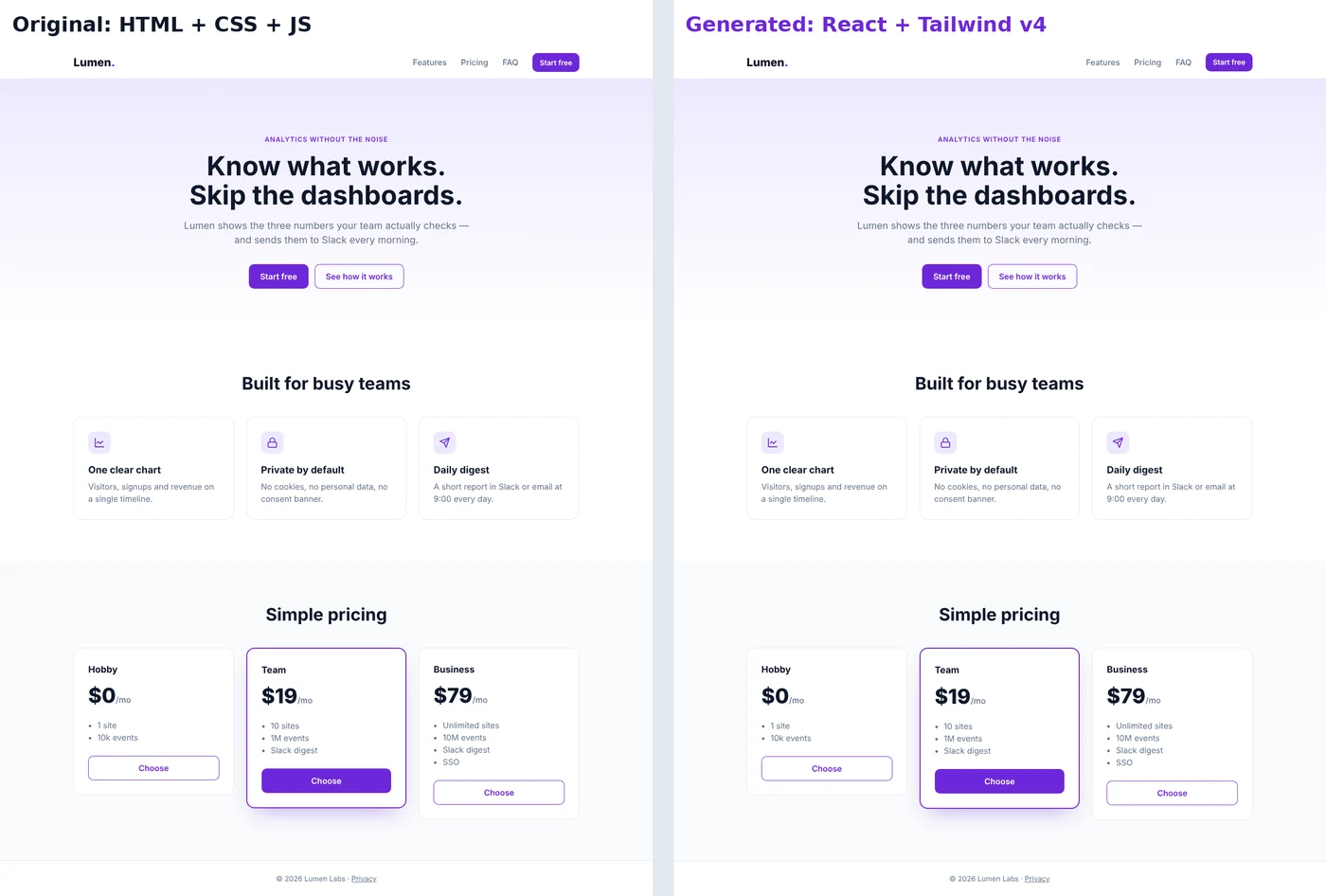
Left: the original HTML + CSS + JS. Right: React + Tailwind v4 generated by the skill. Screenshot diff: 0.00%.
Why "just convert this HTML to React" breaks
Ask an agent to convert HTML to React and it reads the whole page, then retypes it as JSX. Three things go wrong:
- It burns tokens. Every byte is paid for twice, once as input and once as output, and output tokens cost about 5x more.
- It drops chunks. On long files you get
{/* rest of the section */}instead of the rest of the section. - It copies junk. Wrapper divs, dead classes and old scripts end up in your components.
A better prompt doesn't fix this. Most of the job is mechanical, and mechanical work doesn't need a model.
How the skill splits the work
html-to-react is a SKILL.md with instructions plus Node scripts the agent runs. The scripts do everything that has one right answer. The agent only does what needs judgment.
| Scripts (0 tokens) | Agent |
|---|---|
| Clean the HTML: head tags, trackers, dead classes, empty wrappers | Read a short outline instead of the full page |
Convert CSS to Tailwind through a real cascade, turn repeated blocks into .map() | Decide where components start and end, name them |
Write the files, copy images, run tsc, eslint and a screenshot diff | Rebuild the page's JavaScript as React state |
What the agent actually reads
Here is the example landing page from the repo, step by step.
1. Analyze. Instead of 1.3k tokens of HTML, the agent reads a ~400-token outline. Repeated cards are already detected as lists, with their fields:
n21 section#features.features
  n25 div.feature-card ×3 list{icon, featureTitle, featureText}
n37 section#pricing.pricing
n41 div.plan ×3 list{featured, name, price, plans[], href}2. Plan. The agent writes names and boundaries, nothing else:
{
  "components": {
    "n1": "Header",
    "n11": "Hero",
    "n21": "Features",
    "n37": "Pricing",
    "n41": "PlanCard"
  },
  "lists": { "n41": { "name": "plans", "fields": { "plans": "perks" } } },
  "icons": {
    "i1": "lucide:ChartLine",
    "i2": "lucide:Lock",
    "i3": "lucide:Send"
  },
  "client": ["Header"]
}3. Generate. The scripts write the components. Three pricing cards become a data array and one typed PlanCard, and the .plan.featured class becomes a prop:
type PlanCardProps = {
  featured?: boolean;
  name: string;
  price: ReactNode;
  perks: string[];
  href: string;
};4. Behavior and checks. The old script toggled an open class on the mobile menu. The agent rebuilds it with useState at the TODO(h2r) marker. Then check runs tsc and eslint, and visual-diff compares screenshots of the original and the React page.
Results on real pages
Tested inside a Next.js 16 + Tailwind CSS 4 app. Token counts are what the agent would read with and without the skill; diff is the share of pixels that differ between screenshots of the original and the React page at 1280 and 390 px wide.
| Page | HTML | Agent reads | Diff, 1280 px | Diff, 390 px |
|---|---|---|---|---|
| Portfolio: HTML + 30 KB CSS + JS to Tailwind | ~17k | 2.9k | 0.09% | 0.00% |
| Tailwind v2 landing to Tailwind v4 | ~19k | 1.1k | 0.01% | n/a¹ |
Forms, tables, pre, SVG, entities | ~1.2k | 0.5k | 0.02% | 0.05% |
| Pencil export: desktop + mobile to one component set | ~1.7M² | 0.9k | 0.01% | 0.02% |
¹ The template is missing an image at mobile width, so that comparison isn't fair. ² Mostly base64 images.
On full pages the agent reads 6 to 17 times fewer tokens and writes almost no markup, only the plan and the behavior. tsc and eslint pass in every case.
What it handles for you
- CSS to Tailwind that respects the cascade. Specificity, source order, media queries,
:hoverand::before, parent states asgroup-*, sibling states aspeer-*. Every class is validated against your project's Tailwind. - Tailwind v4 traps. Preflight wiping browser defaults, arbitrary breakpoints sorting before
lg:, cascade layers. Tailwind v1–v3 classes are renamed for v4. - Desktop and mobile exports become one component set. Exports of the same page from Figma, Pencil or Framer merge into responsive components with
lg:overrides. Only real differences are rendered twice. - Icons. Inline SVGs become icon components or lucide icons, and icon fonts like Font Awesome map to lucide.
- Your project setup. Next.js App Router or React + Vite, TypeScript or JavaScript, the
@/alias and your indentation. Convert to Tailwind, or keep the original classes with CSS scoped to the page.
Install
From your project folder:
pnpm dlx skills add https://skills.sh/p/899ZGAwJ1eQyiWcU
Or as a Claude Code plugin:
/plugin marketplace add natankatsif/html-to-react-skill
/plugin install html-to-react@html-to-react-skillIt needs Node 18+. The scripts install their dependencies on first run.
I built and tested it with Claude Code, but nothing in it is Claude-specific: it's a SKILL.md plus Node scripts, so any agent that can read the instructions and run Node can use it.
How to use it
Ask your agent:
Convert landing/index.html into React componentsThe skill triggers on its own. You can also run each step yourself:
H="node <skill-dir>/scripts/h2r.mjs"
$H analyze landing/index.html --project .
$H generate .h2r/<slug>/plan.json
$H check .h2r/<slug>/plan.json --tsc --lint
$H visual-diff landing/index.html http://localhost:3000/<route>Limitations
- Behavior is rewritten by the agent. The scripts only show what the old JavaScript did and where.
- Bootstrap and similar frameworks aren't converted to Tailwind. That would be a redesign, not a conversion.
- Small snippets don't pay off. Under ~150 lines the pipeline costs more than it saves, so the skill switches to a manual mode.
FAQ
Can AI convert HTML to React?
Yes. For a short snippet, a plain prompt is fine. For full pages, splitting the job between deterministic scripts and the model gives cleaner components for a fraction of the tokens.
Does it convert CSS to Tailwind?
Yes. In tailwind mode, CSS becomes utilities through a real cascade, checked against your project's Tailwind. In css mode, the original classes stay and the page's CSS is purged and scoped to the page.
Does it work with Next.js?
Yes, with the App Router, and with React + Vite. For Next.js it also writes the page metadata from the original title and description.
Does it only work with Claude Code?
No. It was built and tested with Claude Code, but it's a SKILL.md plus Node scripts with nothing Claude-specific in it.
Is it free?
Yes. It's MIT licensed and open source on GitHub.
Try it
Grab it on GitHub or skills.sh. If it saves you tokens, a star helps other people find it:
natankatsif/html-to-react-skillStar1If it breaks on your export, open an issue or send it over.